Your Agent Shouldn't Decide Alone. Here's How to Keep a Human in Command.
The hard part of human-in-the-loop isn't letting a human approve. It's letting them approve later — hours or days later, on a different machine — without holding a live process hostage the whole time.
Jun 18, 2026 · Upendra Bhandari · HITL
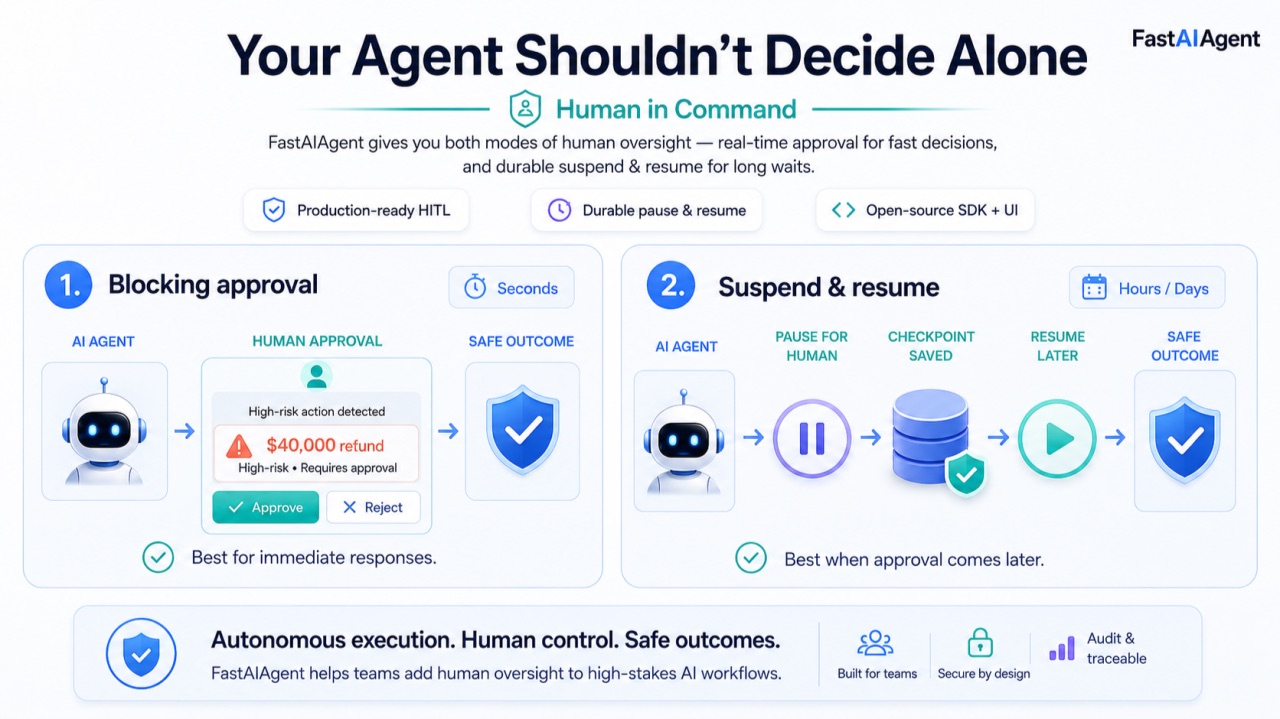
A refund agent approves a $40,000 credit at 2am. No human saw it. By the time anyone noticed, the money was gone.
The fix everyone reaches for first is a blocking pause: the agent stops, waits for a human to approve, then continues. It works perfectly in a notebook. Then you ship it, and a manager in another timezone takes nine hours to respond — and your agent's process has been sitting there the whole time, holding a thread, burning compute, one pod-eviction away from losing the entire request.
The hard part of human-in-the-loop isn't letting a human approve. It's letting a human approve later — minutes, hours, or days later, possibly on a different machine — without holding a live process hostage the whole time.
FastAIAgent gives you both modes, matched to how long the human actually takes.
Two kinds of waiting
Human responses come in two speeds, and they need two different mechanisms.
Seconds: a reviewer is right there, watching the agent run, ready to click approve. A blocking pause is fine — the process waits a moment and continues.
Hours or days: the approver is in another timezone, in a meeting, asleep. No process can or should stay alive that long. You need to suspend the agent entirely — persist its state, let the process exit — and resume it later when the human responds.
Most frameworks give you only the first. FastAIAgent gives you both.
Approach 1: blocking HITL, for fast approvals
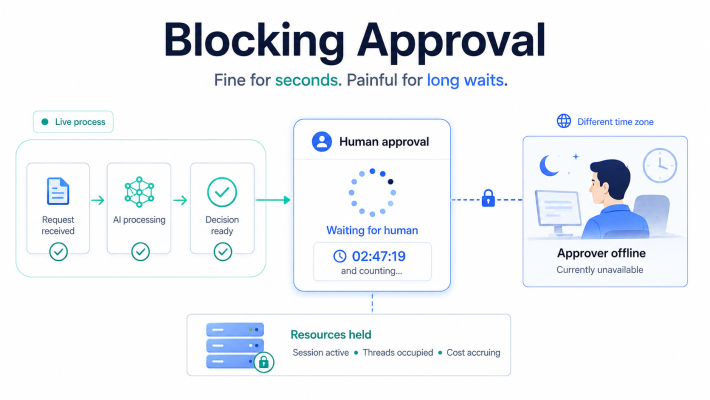
When a human is in the loop in real time, you attach an approval gate as a node and hand the executor a handler. The handler runs in-process and blocks until it returns a decision.
from fastaiagent import Chain

def approval_handler(node, context, state):
    # Synchronous: show the human the context, get a yes/no, return it
    print(f"Approve refund of ${context['amount']}? [y/n]")
    return input().strip().lower() == "y"

chain = Chain("refund-flow", state_schema=RefundState)
chain.add_hitl_node("manager_approval")
# ... wire the rest of the chain ...

result = chain.execute(
    {"amount": 500, "customer_id": "cust_abc"},
    hitl_handler=approval_handler,
)
The handler blocks the run until the human decides. If you don't supply one, the gate auto-approves — useful for tests and local development. This is the right tool when the wait is measured in seconds and a live process is no burden.
But a blocking handler cannot wait three days. For that, you suspend.
Approach 2: suspending interrupt, for long waits
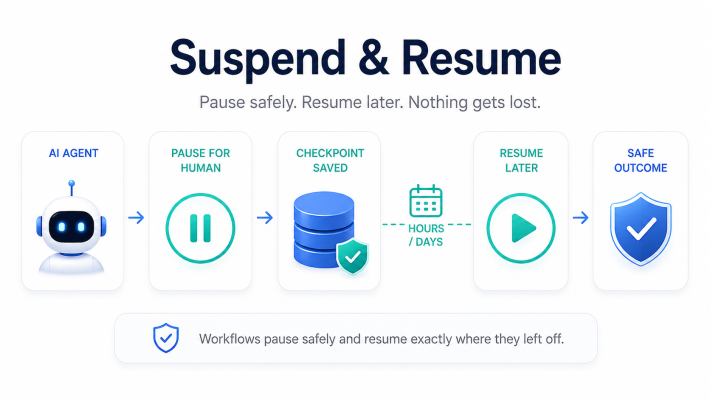
interrupt() doesn't block. It suspends the entire workflow, writes a checkpoint, records a pending interrupt, and lets the process exit cleanly. The agent is frozen, on disk, costing nothing. A separate signal — hours or days later — resumes it.
from fastaiagent import Chain, Resume, interrupt

def refund_node(state):
    if state["amount"] > 10_000:
        approval = interrupt(
            reason="manager_approval",
            context={"amount": state["amount"], "customer_id": state["customer_id"]},
        )
        return {"approved": approval.approved, "approver": approval.metadata.get("approver")}
    return {"approved": True, "auto": True}

chain = Chain("refund-flow", state_schema=RefundState)
chain.add_node("check", function=refund_node)
chain.add_node("process", function=process_refund)
chain.connect("check", "process")

result = chain.execute(
    {"amount": 15_000, "customer_id": "cust_abc"},
    execution_id="refund-abc",
)
print(result.status)   # "paused"
Here's the mechanism, because the details matter. The first time interrupt() runs, it raises an internal signal. The executor catches it, writes a checkpoint marked interrupted, inserts a row into the pending-interrupts table, and returns a paused result. The context you passed is frozen at suspend time — serialized and stored, never recomputed — so the human reviews exactly the situation as it was when the agent stopped.
The process can now exit. The cluster can scale down. The pod can be evicted. Nothing is lost, because the state lives in the checkpoint store, not in memory.
When the human responds — hours or days later, on a completely different process — you resume:
result = chain.aresume(
    "refund-abc",
    resume_value=Resume(approved=True, metadata={"approver": "alice"}),
)
print(result.status)   # "completed"
On resume, the workflow re-enters the same node. This time interrupt() doesn't raise — it returns the Resume you supplied. The agent continues as if the human had answered instantly, except no process waited and no compute was burned in between.
Driving the resume — three ways
A suspended execution can be resumed through whichever channel fits your system.
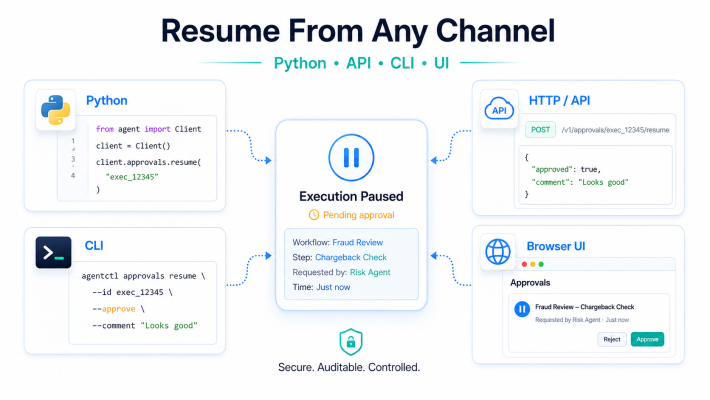
Python, for code-driven flows:
chain.aresume("refund-abc", resume_value=Resume(approved=True, metadata={"approver": "alice"}))HTTP, for a web app or an external approval service:
POST /api/executions/refund-abc/resume
{ "approved": true, "metadata": { "approver": "alice" } }
CLI, for an operator at a terminal:
fastaiagent resume refund-abc --runner refund_flow:chain --value '{"approved": true}'And there's a built-in /approvals page in the local UI — start it with fastaiagent ui — where a human can see every pending interrupt and drive the resume from a browser, no code required.
It works across every orchestration pattern
The interrupt isn't a Chain-only feature. It fires the same way inside an Agent, a Swarm, and a Supervisor team. When the agent that pauses is nested — a worker under a supervisor, calling a tool — the pending interrupt records the full path, so you know exactly which agent, in which team, is waiting on which action.
That matters in production, where a single request can fan out across several agents and you need to know precisely where the human is in command.
The production details that actually bite
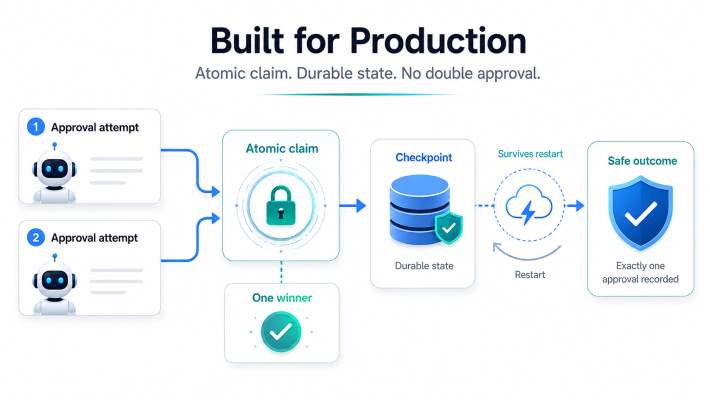
Three things separate a demo from something you'd run for real.
Two people can't double-approve. If a manager clicks approve in the UI at the same moment an automated service calls the resume endpoint, you cannot run the workflow twice. When a resume fires, the first operation is an atomic claim of the pending interrupt — DELETE ... RETURNING on Postgres, a guarded transaction on SQLite. Exactly one caller wins. The loser gets an AlreadyResumed error, and the HTTP route returns a 409. No double refund from a resume race.
It survives restarts. Because the suspended state is a checkpoint on disk, not memory, the resume can happen on a different process than the one that paused. Pause on one pod, approve through the UI, resume on whatever pod picks it up. The store doesn't care which.
There's no built-in timeout — and you should know that. A pending interrupt waits indefinitely. The SDK will not auto-expire it, auto-reject it, or escalate it after some deadline. If your process needs "approve within 24 hours or escalate to the director," that policy is yours to build on top — a scheduled job that checks pending-interrupt age and acts on it. The SDK gives you the durable pause and the clean resume; the expiry and escalation rules are a layer you add. Better to know that now than to assume a timeout that isn't there.
What the human can actually do
Be precise about the human's power, because it's easy to overstate.
Everywhere — Python, HTTP, CLI, the UI — the human returns a decision: approved or not, plus an arbitrary metadata dictionary (who approved, a note, a reference number). That decision flows back into the node, which decides what to do with it.
If you're driving a Chain from Python, you can go further and inject modified state on resume — overriding values in the workflow's state before it continues. That fuller "edit the run" capability is Chain-and-Python only; it isn't available over HTTP or CLI, and not on Agent, Swarm, or Supervisor. For those, the contract is approve/reject plus metadata. Build your gates around that and you won't be surprised.
Where the SDK ends and the platform begins
Everything above is in the open-source SDK: the interrupt primitive, all three resume channels, the /approvals UI, durable checkpointing, the atomic claim. You can run real human-in-the-loop today, for free, on your own infrastructure.
What the SDK gives you is a single approval queue. What it doesn't try to be is an enterprise approval workflow — multiple approvers in sequence, role-based rules for who is allowed to approve a $50,000 refund versus a $500 one, and an immutable audit trail proving who approved what and when. That governance layer is where the platform picks up. For a solo developer or a small team, the SDK's queue is enough. For a regulated enterprise that has to answer to an auditor, the workflow layer is the upgrade.
The control surface
Human-in-the-loop is, underneath, the off-ramp from autonomy. An agent that can act without asking is fast and dangerous. An agent that always asks is safe and useless. The interrupt is how you place the human at exactly the decisions that warrant one — the $40,000 refund, the irreversible action, the call that needs a name attached to it — and nowhere else.
Blocking when the human is right there. Suspending when they're a day away. Durable so a crash never loses the request. Atomic so two approvers never double-act. That's human command over an autonomous system, built to survive production.
FastAIAgent is an open-source agent harness with Agent Replay, crash-proof durability, and a local-first UI. pip install fastaiagent — the SDK is on GitHub.
 {{ meta.author }}