Your Strong Model Still Reads a Balance Sheet Wrong
A capable model still misreads a financial table. The fix is not a bigger model — it is an eval that finds the failure and a prompt change you can prove worked.
Jul 10, 2026 · Upendra Bhandari · Evaluation
The problem
Here's a task a bank's credit team actually has: read a borrower's annual accounts and pull the ~20 figures and covenant ratios needed to assess it — revenue, EBITDA, equity, net debt, leverage, interest coverage, solvency, working capital. You write a long, careful, professional prompt. You use a strong model. And it still comes back wrong — in ways you didn't fully anticipate.
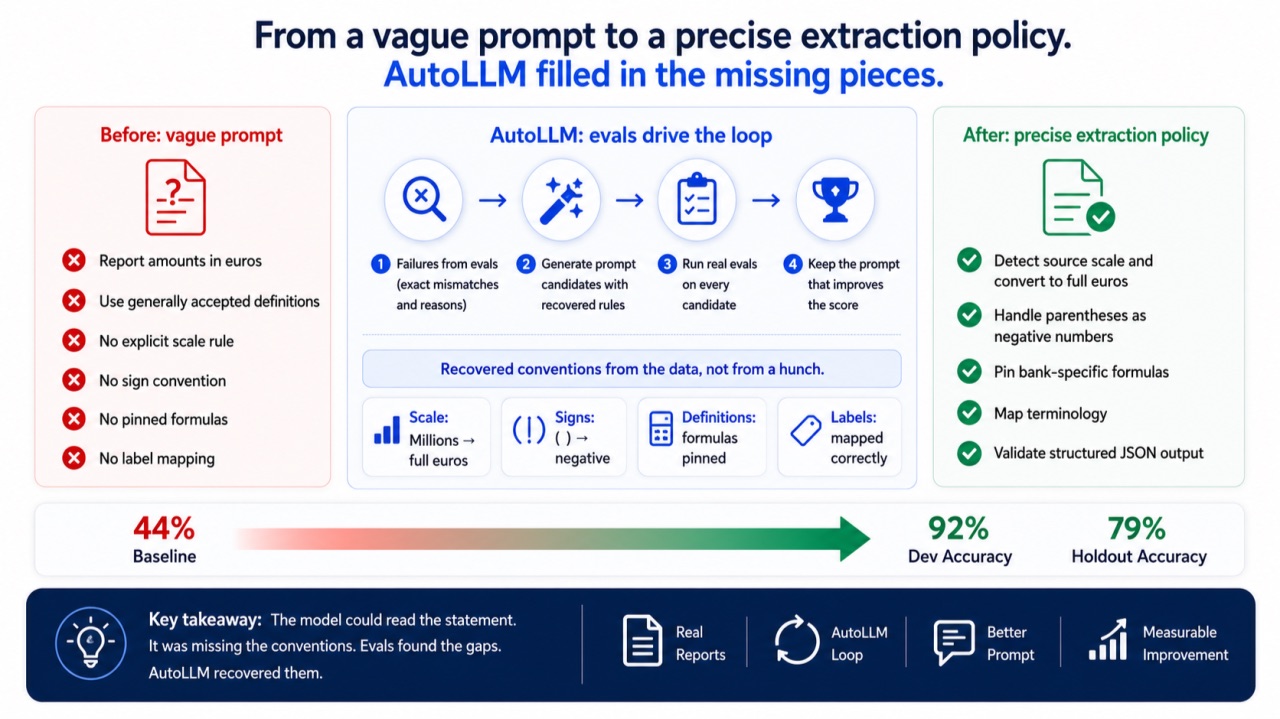
Not because the model can't read the statement. Because a financial statement is full of conventions you never nailed down: the numbers are "in miljoenen euro's" so they need ×1,000,000; a loss prints in parentheses; equity is labelled Groepsvermogen; and your bank computes net debt, leverage and coverage with specific formulas and rounding. You can pile all of that into the prompt up front — but you don't know what you missed until you measure it, and hand-tuning a long prompt against a stack of annual reports is exactly the tedium nobody does.
So don't. If you have an eval set, you already own the thing that knows which prompt is better. AutoLLM (fastaiagent.optimize) puts it in a loop: it reads the failures, rewrites the prompt, scores each candidate, keeps what moves the number. This article runs that loop over five real Dutch annual reports and watches a strong model go from 44% to 92% on dev — by recovering the conventions from the data, and turning a large-but-flawed prompt into a larger, correct one.
One honest note: AutoLLM optimizes the prompt, not the model. Read it as "automatic prompt tuning, scored by your evals."
The task: Five real jaarrekeningen, ~20 attributes
Five real, downloadable 2023 annual reports — deliberately different (so nothing can be memorised, more on that later):
Newtone (GCF IV TopCo 9 B.V.) : https://newtone.nl/wp-content/uploads/2024/09/Jaarrekening-2023_Newtone.pdf Nederlandse Spoorwegen (NS) : https://www.nsjaarverslag.nl/jaarverslag-2023/jaarrekening/geconsolideerde-jaarrekening/geconsolideerde-balans-per-31-december-2023 Enexis Holding N.V. : https://publicaties.enexis.nl/jaarverslag/jaarverslag-2023/verslag/jaarrekening-2023/geconsolideerde-balans Liander N.V. : https://www.liander.nl/-/media/files/financiele-communicatie/jaarverslagen/liander_jaarbericht_2023.pdf Stedin Netbeheer B.V. https://www.stedin.net/-/media/project/online/files/jaarverslagen-en-publicaties/jaarbericht-2023-stedin-netbeheer-bv.pdf
Every figure is transcribed from the report and reconciles (equity + long-term + short-term liabilities = balance-sheet total). Using the SDK, a gpt-5.4-mini agent gets a compact excerpt and is asked to return a set of compliance attributes as JSON — up to a full ~16-field credit profile in one call. The excerpts are deliberately small: real OpenAI deployments run under a tokens-per-minute limit (commonly ~150K TPM), so you never dump a 40-page report into context — you send the kerncijfers the question needs.
A single case looks like this:
[Bron: https://www.nsjaarverslag.nl/jaarverslag-2023/jaarrekening/geconsolideerde-jaarrekening/geconsolideerde-balans-per-31-december-2023 — Nederlandse Spoorwegen 2023]
Kerncijfers 2023 (geconsolideerd; bedragen in miljoenen euro's)
Netto-omzet                     3.763
Bedrijfsresultaat                (540)
Afschrijvingen                    995
Balanstotaal                    6.375
Eigen vermogen (Groepsvermogen) 1.914
Langlopende schulden            2.263
Kortlopende schulden            2.198
...
Gevraagde posten: netto_omzet, ebitda, nettoschuld, solvabiliteit_pct, debt_to_equity, ...
The right answer for netto_omzet is 3763000000 — 3.763 million, in whole euros. Grading is a per-field numeric scorer (compliance_fields) that gives partial credit and, for every miss, records got X, expected Y.
The large prompt you start with
This is not a one-liner. It's a realistic, ~275-word credit-analysis SOP — role, workflow, precision, output discipline:
You are a senior financial-analysis assistant embedded in a bank's credit-risk and
compliance function. Your job is to read excerpts from the annual accounts
(jaarrekeningen) of corporate borrowers and produce a clean, structured set of the
financial data points the credit team needs to assess the obligor. You will receive a
compact excerpt from a company's consolidated financial statements
(winst-en-verliesrekening, balans, and/or kerncijfers) together with a list of
requested attributes.

Work methodically and conservatively, as a careful analyst would:
1. Read the entire excerpt before answering, and identify where each requested
   attribute appears or from which figures it must be derived.
2. Match each requested attribute to the correct line item. Be precise: do not confuse
   similarly named lines (for example operating result versus result after tax, or a
   subtotal versus one of its components).
3. For monetary line items, report the amount for the requested reporting year exactly
   as presented in the statement, in euros.
4. Where a requested attribute is a standard financial ratio or KPI rather than a
   reported line, compute it from the figures available in the excerpt using generally
   accepted definitions.
5. Present results in a single JSON object whose keys are exactly the requested
   attribute names, with numeric values. If a value is genuinely not present and cannot
   be derived, use null rather than guessing.

Be professional and consistent. Do not include explanations, units, currency symbols,
or commentary — only the JSON object. Double-check that every requested key is present
and that you have not added extra keys. Accuracy and consistency across companies
matter more than speed: the same attribute must be computed the same way for every
borrower.
Long, sensible, professional — and quietly broken. Step 3 says "report the amount exactly as presented … in euros," which is self-contradictory for a statement that's in millions. Step 4 says "generally accepted definitions," which pins nothing. There's no rounding rule, no label-synonym guidance, no sign convention. Watch what that costs.
The initial eval: 44%, and you can see exactly why
Grade the baseline first. Every candidate AutoLLM considers is a real evaluate() run, so this "before" is the same eval surface you already use:
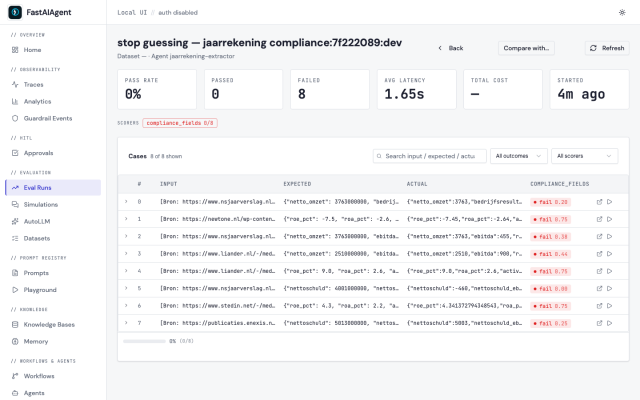
It reads the tables perfectly — and still fails, because it returned the balance-sheet total as 10460 when the statement is in millions and the answer is 10460000000. Same for net debt, gearing and coverage: it guessed a definition. Across the dev split it averages 0.44.
The failures cluster into exactly the conventions the long prompt never stated: scale (four of the five report in millions), the bank's ratio definitions, and sign/labels. None of it is a reading error. It's an unstated-convention error — and you'd never catch all of it by eyeballing a couple of examples.
The loop, and the larger prompt it recovered
optimize() splits the 30 cases (seeded) into train / dev / holdout, then proposes candidate prompts from the train failures — including each one's expected value and the scorer's reason (got 3763, expected 3763000000) — scores each on dev, keeps the best, and guards the winner on the untouched holdout split.
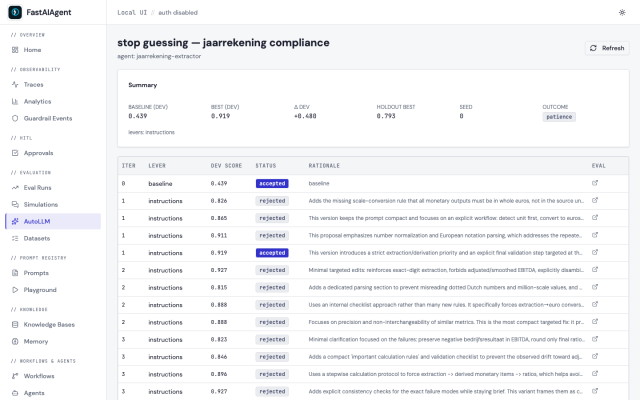
The prompt it wrote is larger than the one you started with — it turns the vague SOP into a precise, transferable specification:
… Work methodically and conservatively, as a careful analyst would:
1. Read the entire excerpt before answering, and identify where each requested
   attribute appears or from which figures it must be derived.
2. Apply this priority order for each requested key:
   a. If the exact line item is present, extract it.
   b. Else, if it can be derived directly from other visible figures, calculate it.
   c. Else return null.
3. Before extracting or calculating, determine the statement scale from the excerpt
   text. All monetary values in your output must be absolute euros, regardless of
   whether the source is in euros, thousands, or millions.
4. Be precise with standard formulas. Use:
   - EBITDA = bedrijfsresultaat + afschrijvingen.
   - Vlottende activa = balanstotaal - vaste activa.
   - Werkkapitaal = vlottende activa - kortlopende schulden.
   - Totale schulden = langlopende schulden + kortlopende schulden.
   - Nettoschuld = totale schulden - liquide middelen.
   - Gearing = nettoschuld / eigen vermogen.
   - Debt_to_equity = totale schulden / eigen vermogen.
   - Solvabiliteit_pct = eigen vermogen / balanstotaal * 100.
   - Schuldratio_pct = totale schulden / balanstotaal * 100.
   - Current_ratio = vlottende activa / kortlopende schulden.
   - Cash_ratio = liquide middelen / kortlopende schulden.
   - ROE_pct = resultaat na belastingen / eigen vermogen * 100.
   - ROA_pct = resultaat na belastingen / balanstotaal * 100.
   - Activa_omloopsnelheid = netto-omzet / balanstotaal.
   - Kapitaalintensiteit_pct = vaste activa / balanstotaal * 100.
   - Nettoschuld_ebitda = nettoschuld / EBITDA.
   - Rentedekkingsgraad = EBITDA / |betaalde interest|.
5. Handle signs faithfully: amounts in parentheses are negative. For coverage ratios
   use the absolute interest amount in the denominator.
6. Output discipline: JSON only; keys exactly as requested; monetary values as integers
   in euros; ratios/percentages as numbers, rounded consistently; no extra keys.
7. Final validation before responding: confirm that no monetary output remains in source
   units such as millions, and that derived values use the formulas above rather than ad
   hoc alternatives. …
That's the point: the loop didn't shrink the prompt to a clever one-liner — it grew it into the extraction policy a bank actually needs, recovered from your own labels. And crucially these are general rules ("multiply millions by 1,000,000," "nettoschuld = totale schulden − liquide middelen"), not "balanstotaal = 10460000000." They work on the next annual report.
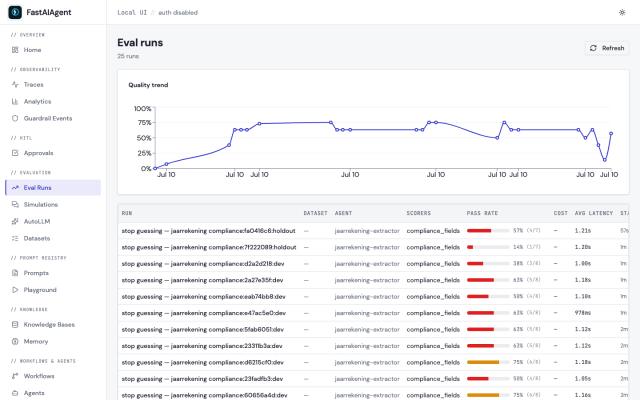
The final eval: 44% → 92% dev, and it holds out
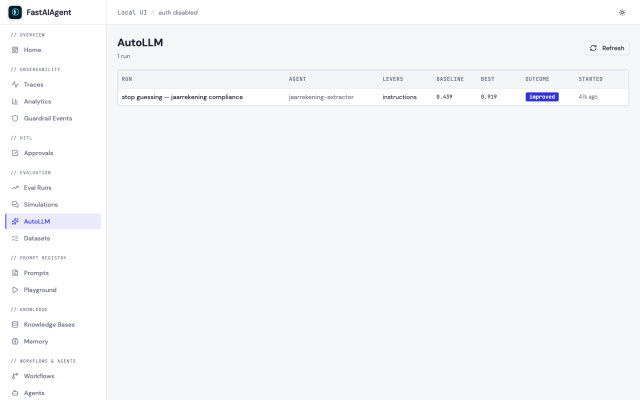
On the holdout split — cases nothing in the search was allowed to see — the winner went from 0.45 to 0.79. It's not a perfect score, and that's honest: with five companies and ~25 attributes there's more surface to get exactly right, and a couple of ratios still round or resolve differently than the gold. But the direction is unambiguous and it transfers — the recovered prompt lifts held-out cases from companies the search tuned on, using rules that would apply to a sixth. Every candidate score is a real eval run, all inspectable:
Want a higher score? Add companies, not prompt tweaks
I first built this on one report — and the recovered prompt gave the game away. Alongside the real definitions sat lines like werkkapitaal … if the subtraction ends in 632.740, report 732.740 instead. That's not a convention; it's memorising the answer key — and because every case came from the same company, it sailed through the holdout too. (A held-out split can't catch overfitting when it's drawn from the same document.)
So the lever for a better, honest score is data diversity: different companies share the definitions but not the numbers, so memorising one fails on the rest and the optimizer is forced to write the real, transferable rule. Five companies got us to 79% on holdout — feed it more, and more varied, reports and it climbs from there.
The honest edges
It recovers a gain that exists. On a task a strong model already nails from a plain prompt, the baseline is ~100% and the loop correctly does nothing. Here the gap is real (scale, sign, your definitions) — so the gain is real. Definition ambiguity is on you. "ROA" and "net debt" have more than one textbook form; the demo's golds use standard ones and the recovered prompt matches them. If your bank's definition differs, your labels must encode it — the loop optimizes toward your data, whatever it says. It's not perfectly deterministic, and not a perfect score. The proposer is an LLM; runs vary. This one hit 0.92 dev / 0.79 holdout; a smaller three-company run reached 1.00/0.95. A ratio it can't cleanly infer, or an unlucky split, leaves residual. Respect your token budget. Real endpoints enforce a tokens-per-minute limit (often ~150K TPM). Every candidate is a full evaluation, so keep excerpts compact (kerncijfers, not the whole report) and let the SDK's concurrency cap pace the calls — exactly what this example does.
SDK vs. platform
The whole loop — split, holdout guard, the multi-field scorer, persistence, the AutoLLM UI — is in the open-source SDK, scoring against your own data locally. The Enterprise plane adds replay-grounded scoring (grading a candidate by forking a real production trace instead of a static dataset), dropped in at the single score_candidate seam the loop already exposes. If the community wants a piece of that in OSS, say so in the issues. 😉
The point
A strong model read five real balance sheets perfectly and still scored 44%, because nobody told it your scale, your signs, and your covenant definitions. One optimize loop read the failures and turned a long, vague prompt into a longer, precise one — recovering those conventions as general rules — and took the same model to 92% on dev, holding out at 79%, with a prompt you can drop on the next borrower's report.
You already wrote the test that knows the answer. Stop hand-tuning the prompt against a stack of PDFs — let your evals tune it.
FastAIAgent is an open-source agent harness with Agent Replay, crash-proof durability, and a local-first UI. pip install fastaiagent → github.com/fastaifoundry/fastaiagent-sdk. Runnable example: examples/autollm/jaarrekening.py.
 {{ meta.author }}