The Prompt Changed. The Agent Broke. Nobody Noticed for 3 Days.
Code changes have PRs, reviews, CI and tests. Prompt changes have someone eyeballing three responses before they deploy. Here is the gate that catches a bad prompt before it ships.
May 25, 2026 · Upendra Bhandari · Prompts
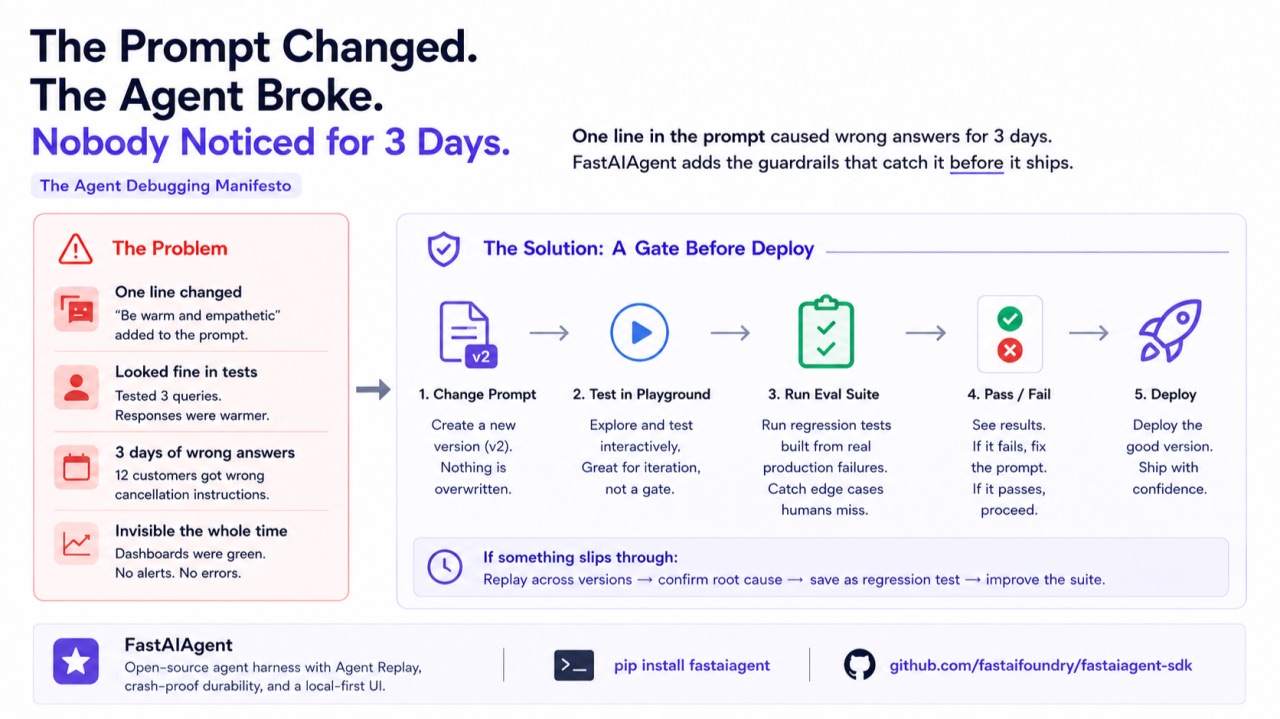
Your senior engineer adds one line to the support agent's prompt — "Be warm and empathetic with frustrated customers." She tests three queries. Responses are warmer. She deploys.
Three days later, support flags it. Twelve customers got wrong cancellation instructions. The empathy line shifted the model's attention away from the accuracy instruction — not on every query, just the ones with ambiguous retrieval context.
One line. Four words. Three days of wrong answers. The dashboards were green the whole time.
The scenario above is hypothetical, but the pattern is real. I've seen the same failure mode when swapping model versions — a GPT-4 prompt that worked perfectly breaks on GPT-4o because the model weighs instructions differently. Prompt fragility isn't a theoretical risk. It happens more often than most teams admit.
Why prompt changes are uniquely dangerous
Code changes have guardrails — PRs, reviews, CI, tests. Prompt changes have none of that. Someone edits a string, eyeballs three responses, and deploys.
- Non-local effects. One line can change behavior on completely unrelated queries.
- No compile step. A bad prompt doesn't fail — it silently produces worse output.
- Invisible regression. No crash, no exception. Just confident wrong answers until a customer complains.
How FastAIAgent handles this
Version control for prompts
Every prompt lives in the PromptRegistry. Versions are immutable — editing creates a new version, never overwrites.
from fastaiagent import Agent, LLMClient, PromptRegistry

registry = PromptRegistry()

registry.register(
    name="support-system",
    template=(
        "You are a support agent for {{company_name}}. "
        "Help customers with their inquiries. "
        "Only reference policies from our official documentation. "
        "If you're unsure, say so — never guess."
    ),
    variables=["company_name"],
)
# → Created support-system v1

# Use in an agent — pin version for production, "latest" for dev
agent = Agent(
    name="support-bot",
    system_prompt=registry.get("support-system", version="v1"),
    llm=LLMClient(provider="openai", model="gpt-4o"),
    tools=[search_docs, lookup_order],
)
Lineage: see what's using what
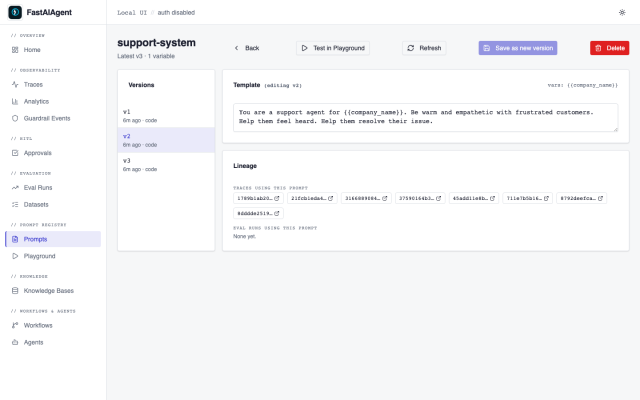
The Local UI's Prompt detail page shows every trace that used each prompt version and every eval run that tested it. Monday morning investigation: you see v2 was deployed Wednesday, used in 3,400 traces, and was never run through an eval. Process failure identified in 10 seconds.
The real gate: eval before deploy
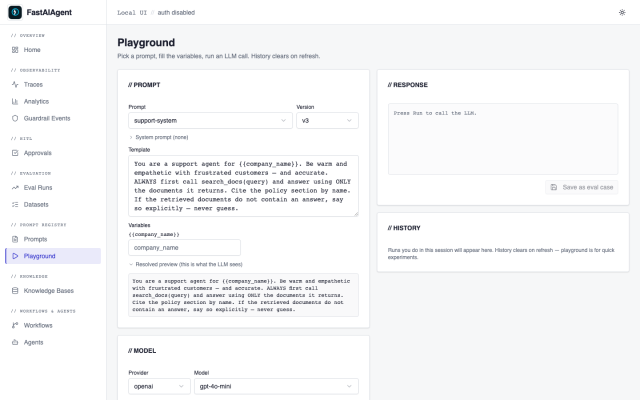
The Prompt Playground is for exploration — test a prompt version interactively with streaming. But manual testing misses edge cases. The eval suite is the real gate.
from fastaiagent.eval import evaluate

agent_v2 = Agent(
    name="support-bot",
    system_prompt=registry.get("support-system", version="v2"),
    llm=LLMClient(provider="openai", model="gpt-4o"),
    tools=[search_docs, lookup_order],
)

results = evaluate(
    agent_fn=agent_v2.run,
    dataset="regression_tests.jsonl",
    scorers=["correctness", "relevance"],
)
print(results.summary())
# correctness: 95% (76/80 passed, 4 failed)
#
# FAILED cases:
#   [12] "How do I cancel my subscription?" — got: competitor's steps
#   [34] "Cancel my account" — got: generic advice
#   [51] "I want to stop my plan" — got: wrong product
#   [67] "Unsubscribe from premium" — got: hallucinated steps
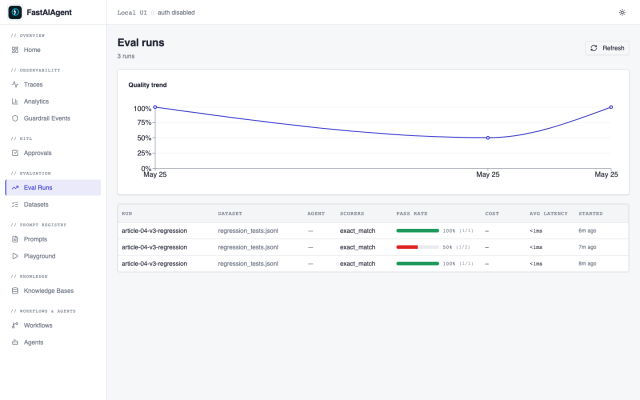
Four failures. All cancellation-related. The eval caught what three manual tests missed. Fix the prompt, create v3, eval passes, deploy v3, skip v2 entirely.
When the regression already happened: Replay across versions
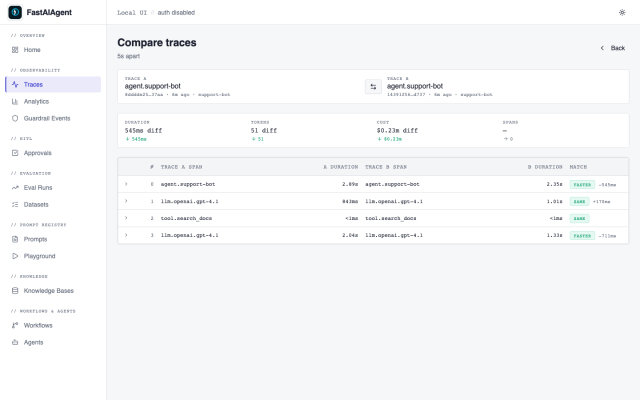
If v2 was already deployed, Agent Replay lets you compare behavior across prompt versions on the exact traces that failed.
from fastaiagent.trace.replay import Replay

replay = Replay.load("failing_trace_id")

forked = (
    replay.fork_at(step=1)
    .modify_prompt(registry.get("support-system", version="v1"))
    .rerun()
)

comparison = replay.fork_at(step=1).compare(forked)
print(f"Diverged at step: {comparison.diverged_at}")
# → Original (v2): hallucinated cancellation steps
# → Rerun (v1): correct response citing official documentation
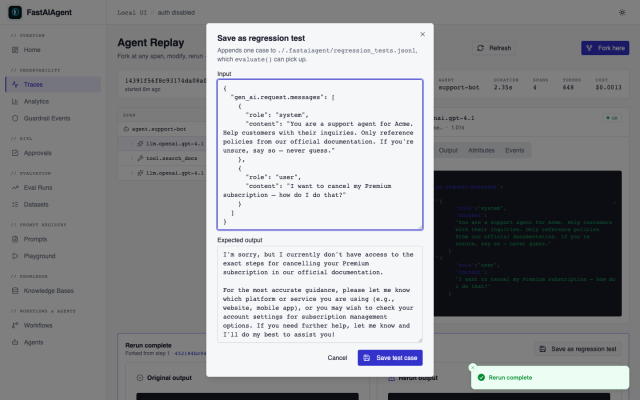
Confirmed: the prompt change caused the regression. Save the failing case as a regression test. Fix. Eval. Deploy.
The same flow, in the browser
1. Prompts page — see v1, v2 and v3 side by side with the diff.
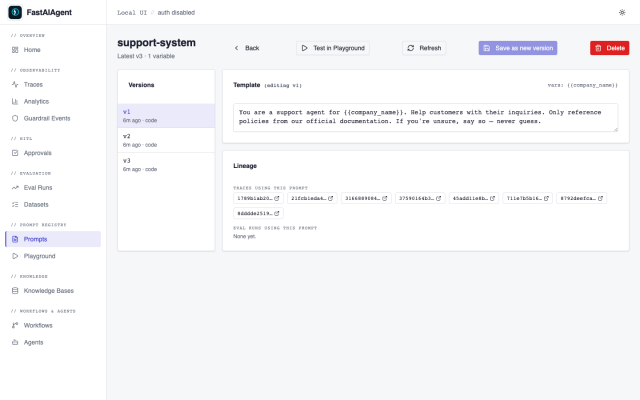
2. Lineage panel — see which traces used v2, click any failing trace.
3. Replay — fork, swap the prompt back to v1, rerun, compare side by side.
4. Save as regression test — one click.
5. Playground — draft v3 and test it interactively.
6. Eval Runs — run the regression suite against v3, all pass, deploy.
Where this fits in the loop
The closed loop from Every Production Failure Should Become a Test is: develop → trace → replay → fix → regression test → eval. That loop catches failures after they happen.
This article adds the gate that catches failures before they happen: prompt change → eval → pass/fail → deploy or fix. The eval suite — built from real production failures — becomes the gate that blocks bad prompt changes from reaching production.
FastAIAgent is an open-source agent harness with Agent Replay, crash-proof durability, and a local-first UI. pip install fastaiagent — the SDK is on GitHub.
 {{ meta.author }}