Give Your Agent Memory It Won't Lie to You
Your agent references a customer trip that never happened. It came from memory — a fact recalled from someone else's conversation. Memory as one object, with scopes you can see.
Jul 2, 2026 · Upendra Bhandari · Memory
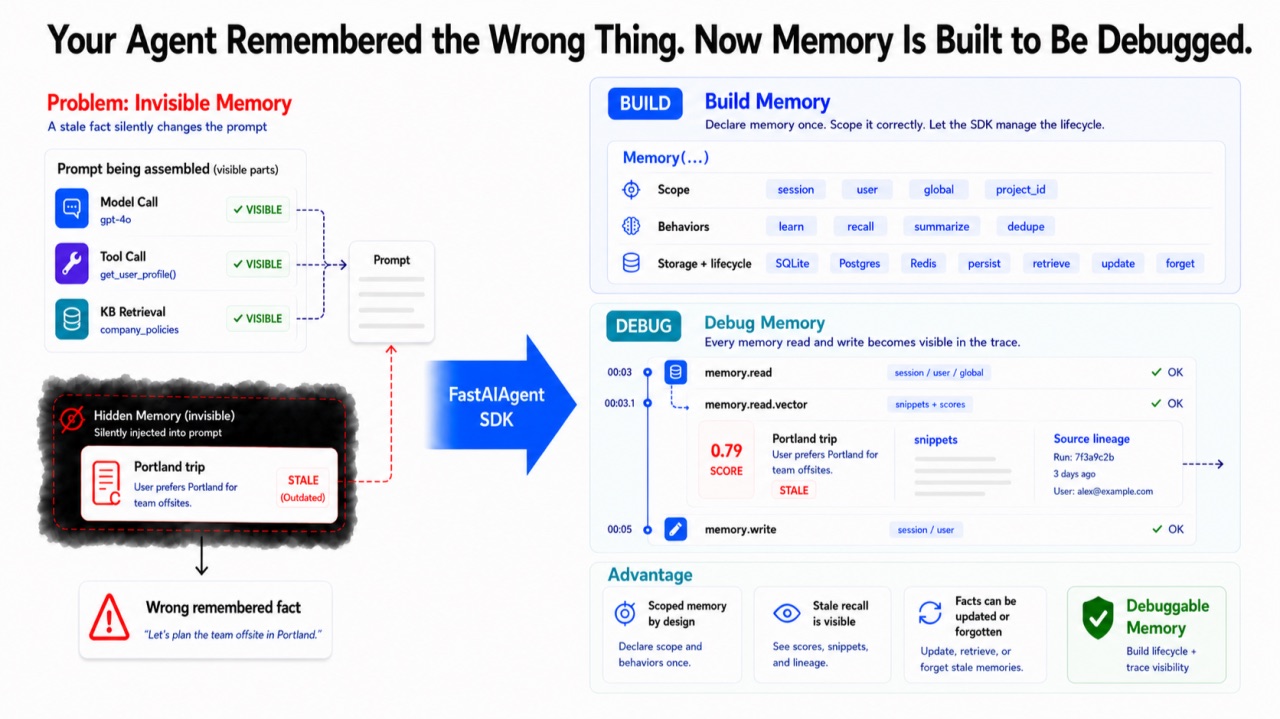
Your agent is three messages into a customer's billing issue when it references their "recent trip to Portland." There was no trip. Reasoning: sound. Knowledge-base retrieval: clean. The model did nothing wrong.
It came from memory. Several conversations ago a different customer mentioned Portland, semantic recall embedded it, and this turn it surfaced with a similarity score just high enough to clear the bar. The agent faithfully used what memory handed it — and until recently, that was the one part of an agent you couldn't see. You could trace the model call, the tool call, the knowledge-base lookup. Memory just silently edited the prompt every turn and left no trace at all.
This article is about building memory into your agent — and, just as importantly, finally seeing it.
One object, not a bolted-on service
In most stacks, memory is something you assemble in application code: a fact store, an extractor, per-user isolation, a retrieval system — four subsystems, each easy to get wrong. Here memory is a peer of the model and the tools, declared once on the agent:
from fastaiagent import Agent, LLMClient, Memory

agent = Agent(
    name="support-bot",
    llm=LLMClient(provider="openai", model="gpt-4o"),
    memory=Memory(location="sqlite", user_id=lambda ctx: ctx.state.user_id),
)
Every capability below is a flag on that one object. Worth saying plainly, since there's a whole category of tools that treat memory as its own product — a separate service you wire in, with its own store, API, and dashboard. This isn't trying to be a smarter memory engine than those. It's a different thing: memory that's native to the agent and visible in the same trace as your model and tool calls. For most agents, that integration matters more than raw memory horsepower.
How long, and for whom
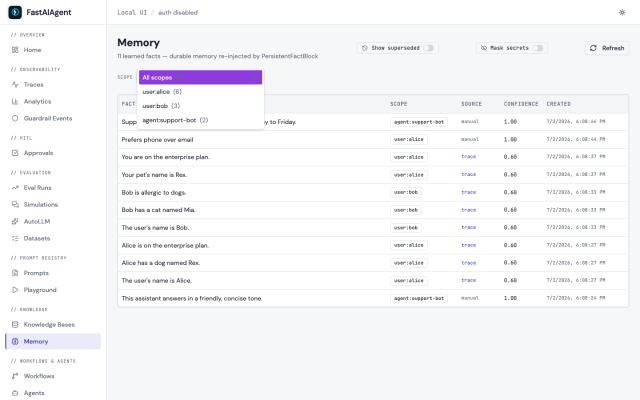
Every fact an agent holds has a lifetime and an owner. Make that explicit and most memory confusion disappears — three tiers:
- session — the working window of the current conversation (window=20).
- user — personal to one user, isolated by id, across all their conversations.
- global — true for everyone using the agent.
You can work the tiers directly, no LLM in the loop:
mem = Memory(location="sqlite", agent_id="support-bot")

mem.persist("Support hours are 9-5 ET.",        tier="global")        # everyone
mem.persist("Alice is on the enterprise plan.", tier="user", id="alice")
mem.persist("Bob prefers phone contact.",       tier="user", id="bob")

mem.retrieve(tier="user", id="alice")   # -> ['Alice is on the enterprise plan.']
mem.retrieve(tier="user", id="")        # -> []   (no id, no leak)
Personal memory is private by default: an empty subject id returns nothing, and persist(tier="user", id="") raises rather than quietly writing a global fact. A single agent definition serves many users — Alice recalls Alice's, Bob recalls Bob's, neither sees the other. And the tiers aren't just an API idea; the Local UI shows each scope with its own count:
What memory does for you automatically
Fact extraction, retrieval-over-history, context compression — three subsystems teams usually build themselves, badly. Here they're flags:
memory=Memory(
    learn=llm,        # extract + persist durable facts, no extraction code from you
    recall="auto",    # past exchanges become searchable by meaning
    summarize=llm,    # compress old turns instead of dropping them
    dedupe=True,      # don't inject the same content twice from two sources
)
And storage is pluggable — SQLite by default, or point location at Postgres or Redis and nothing else in your code changes; all three implement one contract, verified against the real databases. Facts are versioned records, not values you overwrite:
memory.update("Prefers phone over email", old="Prefers email over phone", tier="user", id="alice")update supersedes rather than overwrites — the old fact stays in history, marked superseded.
Seeing what memory recalled
Now the payoff, and the reason this article exists. Every turn, Memory emits a memory.read span with one child per component. For semantic recall you see exactly what it pulled in, with scores, in rank order:
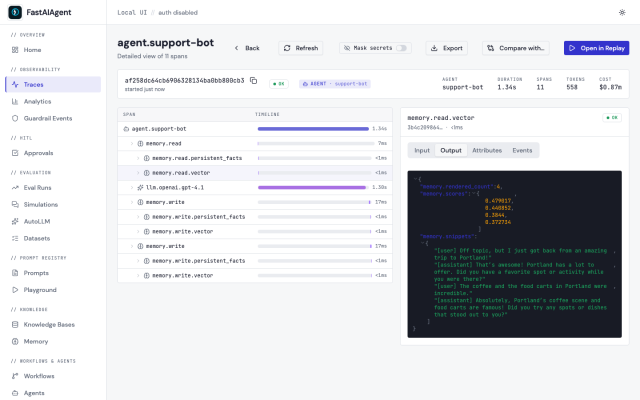
Here's the tell: the top score is 0.48, not 0.9. A billing question is barely related to a Portland anecdote — and yet all four messages got injected, because recall has no relevance threshold; it returns the top-k, whatever the scores. You don't guess why the agent hallucinated a trip — you read the score that let it in. Add a threshold, drop top_k, or weight for recency, and the phantom trip is gone. Without the span, you'd never have known memory was the culprit at all.
The memory.read span sits right in the tree, a peer of the llm call:
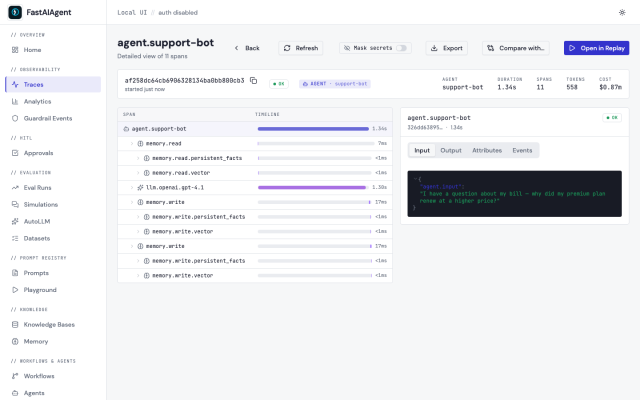
Writes are visible the same way: memory.write shows what each part did (extracted_facts, embedded), and the direct verbs — persist, retrieve, update — emit their own spans with tier, scope, and count. When memory drifts, you watch it happen operation by operation instead of finding out three turns later.
Where a remembered fact came from
Recall visibility answers "what did memory inject." Lineage answers a harder question: when the agent claims to know something about a user, where did it learn that, and can I trust it? With learn on, every extracted fact is stamped with the trace that produced it — on the Memory page each fact shows its Source, a link back to the run, plus a confidence signal and its supersession history.
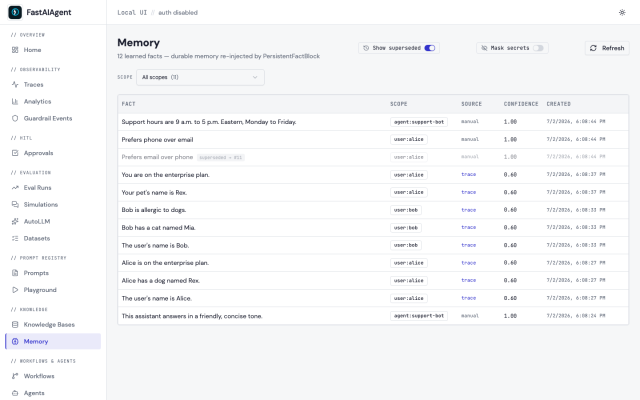
So when the agent asserts "the customer is on the enterprise plan," you click the source and land on the conversation that taught it. Superseded facts stay visible, muted, pointing at what replaced them — nothing is silently lost, which matters the first time someone asks "why did it think that last month?"
Where this fits — honestly
The common cases this is built for are the ones nearly every real agent hits: remember me between conversations, don't confuse my customers, bring back what's relevant, correct a wrong belief, and — why did it say that? For those, the strength is that you assemble nothing: one object on the database you already run, observable in the trace you already read. That integration is the product.
The honest edge, stated as plainly as the strength: if memory is your hardest problem — knowledge-graph relationships, temporal reasoning, best-in-class extraction accuracy — reach for a dedicated memory engine; those go deeper on memory itself. The difference isn't better vs. worse memory; it's native and observable vs. specialized and separate. And for that last 10%, you don't leave — location= takes Postgres/Redis or a custom store, recall= and semantic= take any VectorStore you bring, so the retrieval engine is yours while the memory.* spans, tiers, and lineage stay yours too.
Give your agent memory. Just don't give it memory you can't see — because your agent remembered the wrong thing once, and now you can finally catch it.
FastAIAgent is an open-source agent harness with Agent Replay, crash-proof durability, and a local-first UI. pip install fastaiagent → github.com/fastaifoundry/fastaiagent-sdk
 {{ meta.author }}